Filter Redesign for a
B2B Operations Platform
TL;DR
Redesigned Arbitrack's Product Finder — a B2B filter tool for Amazon FBA merchants — from a broken modal borrowed from a broader-audience tool into a purpose-built, full-page filtering experience scoped to arbitrage sourcing workflows.
Role: Sole designer and first design hire (freelance). Owned the entire process: heuristic audit, problem definition, information architecture, and high-fidelity UI delivery.
Problem: The Product Finder was a near-direct lift from Keepa — a tool built for buyers, catalog researchers, and analysts. The modal format had a scalability ceiling. ~50% of filters were irrelevant to FBA sourcing merchants. Non-neutral defaults silently narrowed results. No onboarding, no visible filter state, broken information hierarchy.
Solution: Full-page experience with 15 MVP filters scoped to the target audience. Eight design decisions backed by UX principles: neutral defaults, inline active state indicators, presets at primacy position, Sort By separated into a sticky footer, consistent field system throughout.
Impact: Filter set reduced 120 → 15, audience-scoped with layout built to scale. 7 Laws of UX applied across 8 design decisions. Analytics instrumentation in progress — tracking filter submission rate, time-to-first-result, and preset adoption.
Overview
Arbitrack is a B2B SaaS platform for Amazon third-party merchants. So far, it spans three core areas:
- Sourcing — lead management, product tracking, product finder, purchases, and gift cards
- Operations — prep management, shipments, inventory, and employee management
- Finances — expenses, P&L reporting, and product analytics
I joined Arbitrack in 2026 as its first designer. The product was in closed beta with incomplete features and no design system. I'd used it as an Amazon merchant before joining and reached out directly.
Arbitrack's Product Finder connects via API to a third-party tool built for a broader audience: buyers, catalog researchers, and analysts. Arbitrack's version narrows the scope to arbitrage merchants. The redesign stripped out the inherited noise and rebuilt the experience around how those merchants actually work.
Problem & Goals
Auditing both the reference tool and Arbitrack's version 0 surfaced eight problems.


Design challenge: Rebuild the Product Finder as a filtering experience that works for new users without slowing down experienced ones, and scales as the filter set grows.
Process
Explored filter ordering, sub-filter placement, and the modal-vs-page question. Chose a full page: the filter density made the modal a dead end at launch, and a scrollable modal degrades with every addition. A full page fits the current filter set and scales as more are added.
The sidebar structure pointed the same direction. Lead Bank, Tracking, and Purchases are management surfaces for existing data. Product Finder is discovery: configure filters, run a search, review results. It feeds Lead Bank directly: a merchant finds a product and adds it as a lead. Separate pages preserve that handoff rather than burying it in a nested UI.
Eight decisions:
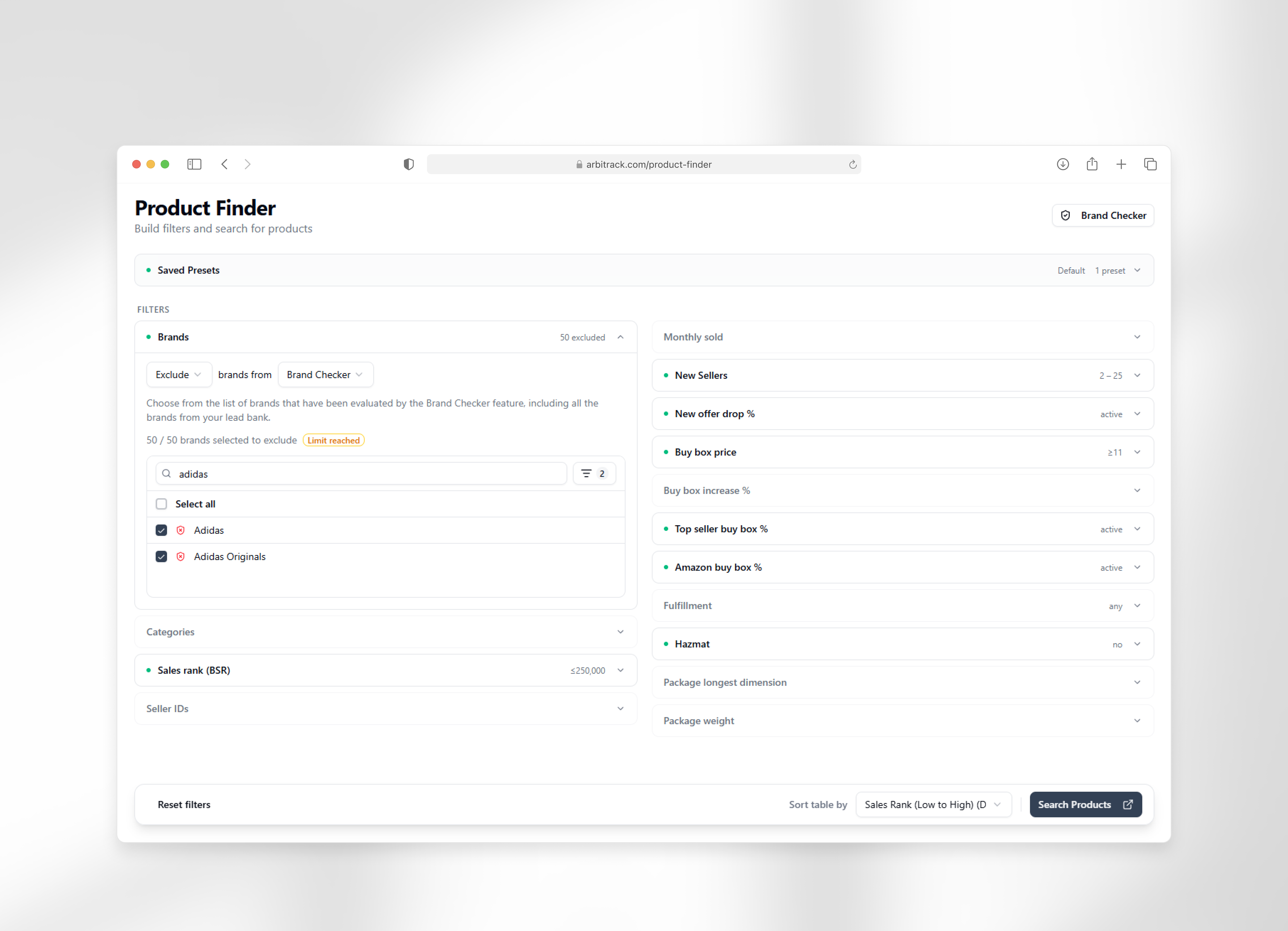
- Lightweight onboarding The page opens with a persistent subtitle: "Build filters and search for products." New users get immediate context; returning merchants tune it out. No modal or guided tour required.
- Saved Presets at the top Profitable merchants reuse the same filter configurations. Placing presets at the top gives returning merchants direct access before they touch a single filter.Serial Position Effect: items at primacy position are recalled most reliably — presets at the top means returning merchants encounter their most-used shortcut before touching a single filter.
- Two-column filter layout Left column: categorical inputs (brands, categories, BSR range, seller IDs). Right column: performance metrics (buy box percentage, fulfillment type, hazmat flags, dimensions). Merchants scope by category first, then qualify on metrics. The column split follows that sequence.Hick's Law: splitting filters into two bounded groups reduces decision complexity at each column — users aren't choosing from 15 undifferentiated options, they're choosing within categorical or performance scope.Miller's Law: two bounded columns keep the filter set within working memory limits — scannable without cognitive overload.
- Active state indicators Each filter row shows a colored dot and its current value when active, without expanding the row. In the reference tool, active filters only appear in a floating card after submission: easy to miss and invisible before first use. Inline indicators let merchants verify their full configuration before running a search.Von Restorff Effect: an active filter row visually isolates itself from inactive ones through the colored dot, making it immediately identifiable in a list of identical-looking items.Zeigarnik Effect: the visible active state keeps unconfigured filters in working memory, motivating a review of the full configuration before running a search.
- Neutral defaults Every filter opens unset: no pre-selected ranges, no pre-checked options. The previous version shipped several filters with non-neutral defaults that silently narrowed results. Any narrowing in the redesign is intentional.
- Sort By in a sticky footer Filtering determines which products appear. Sorting determines how to read them. They're sequential, not parallel. Placing Sort By alongside filters conflates the two. In the reference tool, clearing filters requires scrolling to the modal's top, and that option only appears after applying a filter. The sticky footer keeps Sort By, Reset, and Search accessible at all times, and positions Sort By as the last step before running a search.Serial Position Effect: Sort By occupies recency position — the last step before running a search — reinforcing its role as a post-filter action distinct from filtering.
- Consistent field system Every filter row uses the same label style, input pattern, and placeholder format. The previous version had mismatched fonts, inconsistent placeholder text, and misaligned inputs. A uniform system makes the form scannable and cuts the visual noise.Aesthetic Usability Effect: a visually consistent form is perceived as more usable and trustworthy — reducing noise lowers the threshold to engage with the filters.Law of Uniform Connectedness: rows sharing the same label style, input pattern, and placeholder format are perceived as elements of the same coherent system.
- Reduced filter set, built to scale The reference tool exposes ~120 filters across 800+ input fields, built for buyers, catalog researchers, and technical analysts. For an FBA sourcing merchant, most of that is noise. The MVP launched with 15 filters covering what this audience uses. The layout absorbs future additions without restructuring: more filters are on the roadmap, and adding them requires no redesign.Hick's Law: reducing the filter set from 120 to 15 directly reduces decision time. Fewer choices, faster configuration.

Outcomes & Results
The redesign replaced a scrollable modal with a dedicated page, applied a consistent field system, reset all defaults to neutral, and scoped the filter set to what FBA sourcing merchants use.
Quantitative data is pending analytics instrumentation. The next phase tracks filter submission rate, session abandonment, time-to-first-result, and preset usage.
Next steps. Analytics instrumentation is in progress. Signals being tracked: filter submission rate, time-to-first-result, return session rate, and preset save/reapply frequency once presets ship.
Also on the roadmap: persistent onboarding flows, feature-level walkthroughs accessible at any time. The page subtitle covers day-one context, but Product Finder has enough depth that a structured walkthrough would let users explore further without leaving for documentation.
What I'd revisit. Filter ordering warrants follow-up once usage data shows which filters experienced merchants reach for first. If they consistently skip to mid-list filters, the order should adapt. Usability testing before the next major filter addition would catch hierarchy issues before they compound.
Allen Chung has done great work for Arbitrack. He took ownership of our UI/UX from day one and consistently raised the bar – not just executing what I asked for, but spotting opportunities and proposing improvements I had not even thought of. That kind of initiative is exactly what you want in a designer.
Allen is professional, easy to work with, and genuinely invested in getting the details right. The work he's done has made Arbitrack noticeably better, and I highly recommend him.